
3.9 KiB
Nadir Kernel
Nadir is an x86-64 kernel written from scratch. The name Nadir comes from the Arabic word naẓīr. In astronomy it means the point of lowest elevation, in opposition to the zenith. The documentation assumes general knowlege about how operating systems work.
Status of the project
The project is in its foundation phase and is not yet usable. How the boot chain works: a BIOS boot sector loads the kernel, switches through 32-bit protected mode into 64-bit long mode, and runs C code (kmain). The interrupt layer is live: CPU exceptions (vectors 0-31) print diagnostics, the 8259 PIC is remapped to vectors 32-47, the PIT ticks at 100 Hz on IRQ0, and PS/2 keyboard input on IRQ1 echoes to the VGA console (COM1 mirrors output at 38400 8N1). Next: memory management.
Getting started
Prerequisites
You need an assembler, a C toolchain, and an emulator:
- nasm assembles the boot sector and the long-mode entry stub.
- gcc, binutils (
ld,objcopy) and make build the C kernel (gccpulls inbinutilson most distros). - qemu-system-x86_64 runs the resulting image.
Install everything from your package manager:
Debian / Ubuntu
sudo apt install nasm qemu-system-x86 gcc make
Fedora
sudo dnf install nasm qemu-system-x86 gcc make
Arch Linux
sudo pacman -S nasm qemu-desktop gcc make
macOS (Homebrew)
brew install nasm qemu gcc make
Windows
I can only recommend using Linux distribution, but the Windows Subsystem for Linux is a valid path if you are exclusively running Windows. Install Ubuntu from the Microsoft Store, then run the Debian command above inside its terminal (QEMU's window renders automatically through WSLg).
Running the kernel
From the repository root:
make        # builds nadir.img
make run    # boots it in QEMU
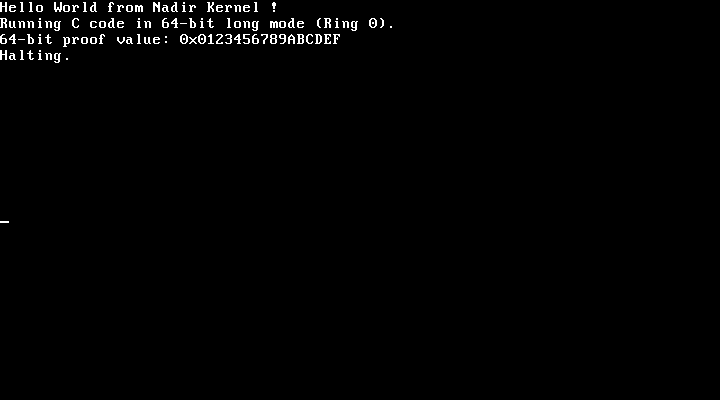
A QEMU window opens and you should see this:
Troubleshooting
| Symptom | Cause |
|---|---|
Boot failed: not a bootable disk |
The first 512 bytes of nadir.img are not a valid boot sector (they must end with the 0xAA55 signature). Re-run make and check it completes without errors. |
| Black screen / blinking cursor | The boot sector only speaks legacy BIOS (int 0x10 text mode). This works out of the box with QEMU's default SeaBIOS firmware but will not boot under UEFI-only firmware (or UEFI-only real hardware) unless legacy/CSM boot is enabled. |
QEMU reboots in a loop after entering protected mode (or before any C output) |
A triple fault in the boot chain: the CPU crashed with no IDT installed and reset itself. Boot with qemu-system-x86_64 -fda nadir.img -d int -no-reboot and read the fault (v=...) plus registers from the log. |
| No window appears under WSL2 | Use the -display curses variant above. It should work in any terminal. |
How booting works
- The BIOS loads the 512-byte sector (
kernel/arch/x86_64/boot.asm) at0x7C00: it enables A20, loads the kernel to0x10000, installs a flat GDT, and enters 32-bit protected mode. - The stage-2 entry (
kernel/arch/x86_64/entry.asm) checks for long mode, identity-maps the first 1 GB with 2 MB pages, enables paging, jumps to 64-bit code, zeroes BSS, and callskmain. kmain(kernel/core/kmain.c) installs the exception IDT, remaps the PIC, installs IRQ gates, starts the serial log, PIT and keyboard, enables interrupts (sti), then loops onhlt: uptime prints ~1/s and keystrokes echo via the VGA text console (kernel/arch/x86_64/console.c,include/console.h).
The full memory map lives in the header comment of kernel/arch/x86_64/boot.asm.
Contributing
Every contribution is welcome. Please fork and send a pull request if you wish to contribute. You will be credited at the end of this very file. Please see CONTRIBUTING for more information.
License
This software is released under the MIT license. See the LICENSE file for details.