| docs/assets | ||
| .gitignore | ||
| boot.asm | ||
| README.md | ||

Nadir Kernel
Nadir is an x86-64 kernel written from scratch. The name Nadir comes from the Arabic word naẓīr. In astronomy it means the point of lowest elevation, in opposition to the zenith. The documentation assumes general knowlege about how operating systems work.
Status of the project
The project is in its foundation phase and is not yet usable. Only the bootloader is currently being written.
Getting started
Prerequisites
You need two tools:
- nasm to assemble
boot.asminto a bootable image. - qemu-system-x86_64, the emulator used to run it.
Install both from your package manager:
Debian / Ubuntu
sudo apt install nasm qemu-system-x86
Fedora
sudo dnf install nasm qemu-system-x86
Arch Linux
sudo pacman -S nasm qemu-desktop
macOS (Homebrew)
brew install nasm qemu
Windows
I can only recommend using Linux distribution, but the Windows Subsystem for Linux is a valid path if you are exclusively running Windows. Install Ubuntu from the Microsoft Store, then run the Debian command above inside its terminal (QEMU's window renders automatically through WSLg).
Running the kernel
From the repository root:
nasm -f bin boot.asm -o boot.bin
qemu-system-x86_64 -fda boot.bin
A QEMU window opens and you should see this:
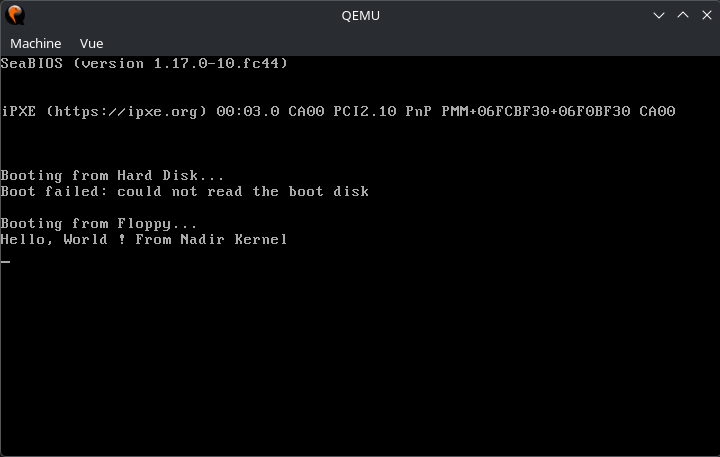
Notes:
-fdaboots the image as a BIOS floppy. QEMU's default firmware loads it at address0x7C00and executes it in 16-bit real mode.boot.binis a generated artifact and is ignored by git, so you need to build it first.rm boot.bincleans up and it will regenerates on the nextnasmrun.- There is no build script or Makefile yet. Those two commands are the whole toolchain.
- Running over SSH or in a bare terminal? Add
-display cursesto render the boot screen as text instead of a window:
Quit withqemu-system-x86_64 -fda boot.bin -display cursesCtrl-AthenX.
Troubleshooting
| Symptom | Cause |
|---|---|
Boot failed: not a bootable disk |
boot.bin is not a valid boot sector: it must be exactly 512 bytes and end with the 0xAA55 boot signature. Re-run the nasm step and check it completes without errors. |
| Black screen / blinking cursor | The boot sector only speaks legacy BIOS (int 0x10 text mode). This works out of the box with QEMU's default SeaBIOS firmware but will not boot under UEFI-only firmware (or UEFI-only real hardware) unless legacy/CSM boot is enabled. |
| No window appears under WSL2 | Use the -display curses variant above. It should work in any terminal. |